I have some really cute looking holiday themed freebies for you through the Share the Memories affiliate program. These links will take you to the my memories store, but you don't need the my memories scrapbooking software to make the freebies work. They will work in any image program. They look like they would make some great cards. I think I'm going to grab them myself and see what I can do with them this year.

Showing posts with label scrapbooking. Show all posts
Showing posts with label scrapbooking. Show all posts
Monday, November 4, 2013

Saturday, March 30, 2013
PS and PSP Comparison Experiments: Post 6
I wasn't intending to do a comparison experiment tonight, but I feel like this is an important one to make for anybody who might be trying to decide which photo editor is the better choice.
I was making some flowers for an upcoming project. I used a really nice Photoshop action from Deliciousscrapshop.com for the base flowers. I intended to make one of each, recolor them for a set and add other elements for a finished design. It seems to take longer to make a set like that in Photoshop(I can't find a "duplicate window" option or a button that lets me save all open docs at once. To be fair, they may just be hidden.)
Edit: I did, in fact, find the duplicate option. (Image>Duplicate) PSP users will be annoyed by the lack of an assigned shortcut key and inability to use shift +d; I assigned one manually. My fingers will need some re-training.
Anyway, I saved a set of flowers in Photoshop, then I decided to try recoloring some with adjustment layers in Paintshop Pro because I could save them more quickly.
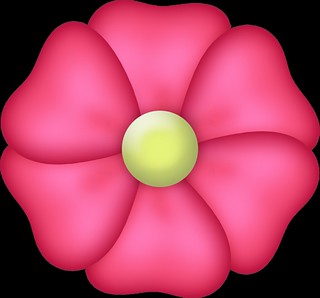
Here is the original finished flower from Photoshop.
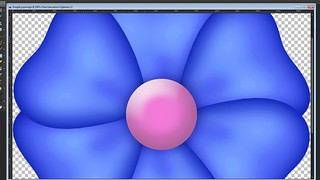
Here is what the recoloring looked like in Paint Shop Pro. I used a hue/saturation adjustment layer, but only altered the hue.
For comparative purposes, here is what the same method yields with just about the same settings in Photoshop.
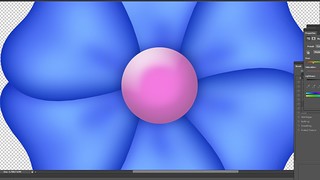
You don't even really need to look at the full sized screenshots in order to see the pixelation, but if you do look, you'll see how poor the image quality is in comparison to the one recolored in Photoshop. I didn't use the exact same settings in PS because I wasn't starting out to do an experiment so I didn't save any of my original PSP files. So, to be fair, I tried the process several more times in PSP with different color adjustments. I made about 12 of them. Each time I got similar (crappy) results. By using the same adjustment layer in Photoshop, I got a nice, useable flower.
Now these flowers are large. They're high resolution and that might have some effect on Paint Shop Pro's ability to handle them, but a lot of home users rely on Paint Shop Pro for their digital scrapbooking--which is what these flowers are meant for. I'm sure I could manually recolor them with the target brush or try to use color overlay layers, but I should be able to use a hue/saturation adjustment layer to achieve a simple recoloring effect without this much trouble. That's what adjustment layers are there for. They're supposed to give the user a flexible way to make non-destructive enhancements or changes to an image
I'm really disappointed in this. I've been using PSP for a long time, and I do firmly believe that Photoshop is overpriced for what it does. That said, Paint Shop Pro failed dismally in this project. There's no way I would have been able to present a client with the flowers I made in PSP. I feel like I just got a little payback for all the times I've teased my Photoshop using friends for features that "my program" had and theirs didn't.
I don't know if I'm converted yet, but I'm certainly willing to admit that Photoshop's got the superior functionality with this particular feature. If I had to do a project like this again, I would definitely opt to do it in Photoshop.
I was making some flowers for an upcoming project. I used a really nice Photoshop action from Deliciousscrapshop.com for the base flowers. I intended to make one of each, recolor them for a set and add other elements for a finished design. It seems to take longer to make a set like that in Photoshop
Edit: I did, in fact, find the duplicate option. (Image>Duplicate) PSP users will be annoyed by the lack of an assigned shortcut key and inability to use shift +d; I assigned one manually. My fingers will need some re-training.
Anyway, I saved a set of flowers in Photoshop, then I decided to try recoloring some with adjustment layers in Paintshop Pro because I could save them more quickly.
Here is the original finished flower from Photoshop.
Here is what the recoloring looked like in Paint Shop Pro. I used a hue/saturation adjustment layer, but only altered the hue.
For comparative purposes, here is what the same method yields with just about the same settings in Photoshop.
You don't even really need to look at the full sized screenshots in order to see the pixelation, but if you do look, you'll see how poor the image quality is in comparison to the one recolored in Photoshop. I didn't use the exact same settings in PS because I wasn't starting out to do an experiment so I didn't save any of my original PSP files. So, to be fair, I tried the process several more times in PSP with different color adjustments. I made about 12 of them. Each time I got similar (crappy) results. By using the same adjustment layer in Photoshop, I got a nice, useable flower.
Now these flowers are large. They're high resolution and that might have some effect on Paint Shop Pro's ability to handle them, but a lot of home users rely on Paint Shop Pro for their digital scrapbooking--which is what these flowers are meant for. I'm sure I could manually recolor them with the target brush or try to use color overlay layers, but I should be able to use a hue/saturation adjustment layer to achieve a simple recoloring effect without this much trouble. That's what adjustment layers are there for. They're supposed to give the user a flexible way to make non-destructive enhancements or changes to an image
I'm really disappointed in this. I've been using PSP for a long time, and I do firmly believe that Photoshop is overpriced for what it does. That said, Paint Shop Pro failed dismally in this project. There's no way I would have been able to present a client with the flowers I made in PSP. I feel like I just got a little payback for all the times I've teased my Photoshop using friends for features that "my program" had and theirs didn't.
I don't know if I'm converted yet, but I'm certainly willing to admit that Photoshop's got the superior functionality with this particular feature. If I had to do a project like this again, I would definitely opt to do it in Photoshop.
Saturday, February 9, 2013
Donation Pack 3

Special thank yous to
Alan
Katja
and the person who didn't leave a name.
Monday, February 4, 2013
Vignette Papers Unrestricted
These are leftovers from last month. I forgot to post them here.

Free for any use. A set of scrapbook papers/backgrounds made in Paint Shop Pro.


Vignette Papers, a set on Flickr.
Via Flickr:Sunday, December 2, 2012
Scrapbook Elements, Post 1
Unrestricted, use for whatever you want.
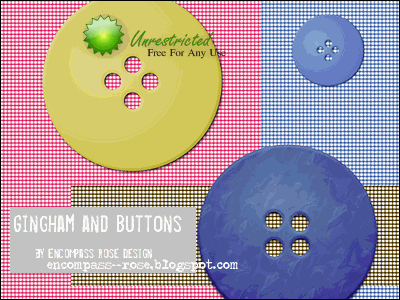
I made these as an experiment in scrapbook design. I've never been into scrapbooking, but I have some friends who are. I don't know whether I'll do any more, but it was a fun learning experience. Everything was saved at print quality so you can use it for digital or handmade projects. The backgrounds will also work for other types of projects besides scrapbooking.
I made these as an experiment in scrapbook design. I've never been into scrapbooking, but I have some friends who are. I don't know whether I'll do any more, but it was a fun learning experience. Everything was saved at print quality so you can use it for digital or handmade projects. The backgrounds will also work for other types of projects besides scrapbooking.
Larger previews and links below.
Subscribe to:
Posts (Atom)